
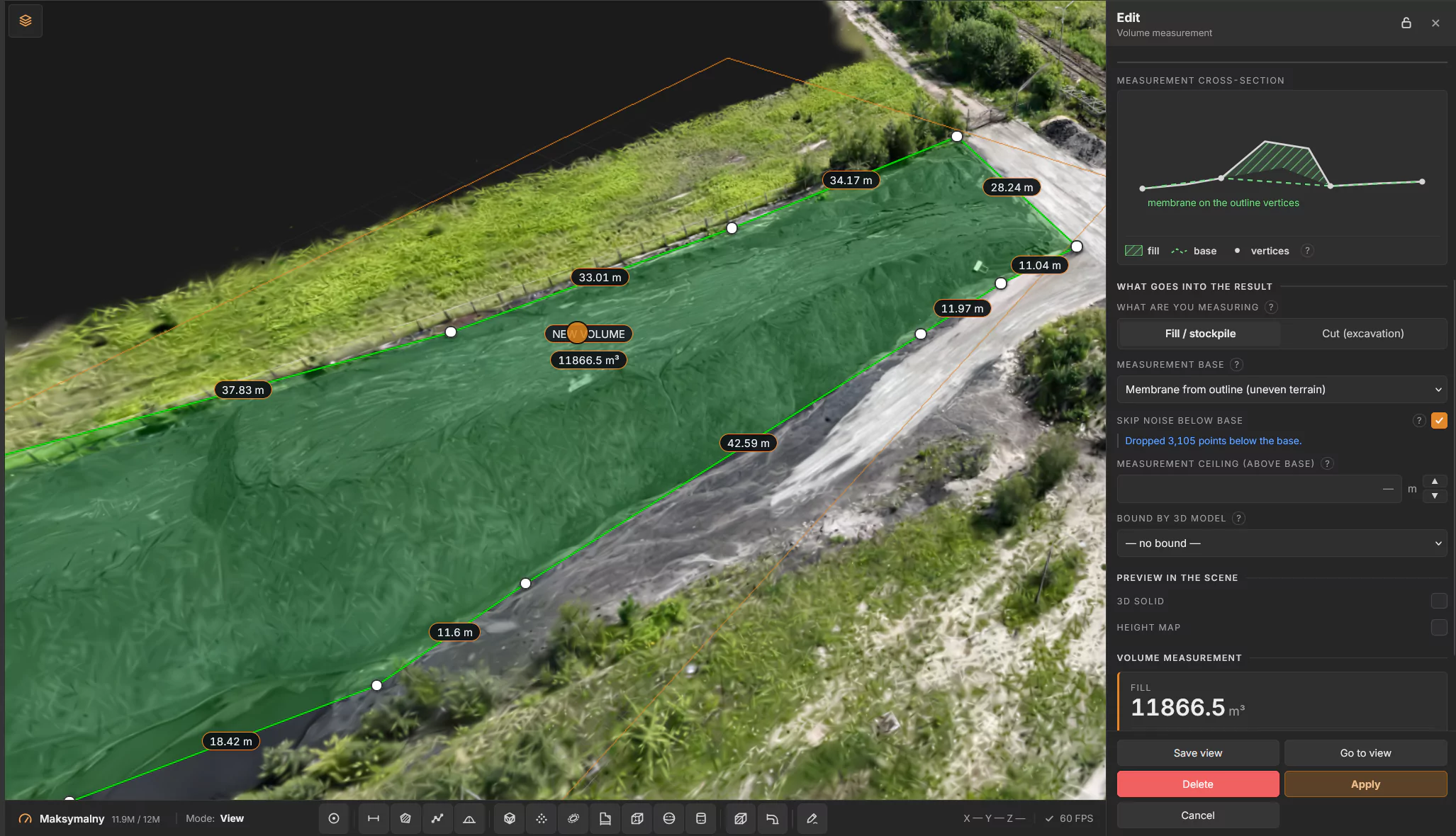
Knowing how much material sits on the yard is basic plant management – for inventory, purchasing and month-end reporting. Yet stockpiles are still often measured by walking the yard or estimated by eye. With an up-to-date 3D scan of the yard, you can measure the volume of a stockpile in a few minutes, from your desk, and every colleague sees the same result.
This guide shows how to do it in PlantScope, our web platform for working on 3D scans of industrial plants.
Why measure stockpiles on a 3D scan
- No walking the yard. You measure in the browser, on the scan, instead of on site.
- Repeatable. The outline and settings are saved, so the next measurement uses the same method.
- Shared. Colleagues and management see the same number, the outline and the report.
What you need
An up-to-date 3D scan of the area loaded into PlantScope – a point cloud, a mesh or a splat scan. The more recent the scan, the closer the result is to what is on the yard today.
Step by step
- Open the plant and choose Volume measurement on the toolbar at the bottom of the screen.
- Click the points of the outline around the stockpile, one by one. You need at least three points, and the outline must not cross itself. Press Enter to finish.
- Choose what you are measuring: Fill / stockpile or Cut / excavation.
- Choose the measurement base – the surface the volume is calculated from (see below).
- Optionally: skip noise below the base, set a ceiling above the base, or bound the measurement by a 3D model.
- Check the preview: the cross-section, the 3D solid and the height map show what is being counted.
- Read the result – fill, cut and balance – and download the report.
Choosing the right base
The base is the biggest single source of error in stockpile measurement, so it is worth choosing it consciously:
- Lowest point of the outline – for piles standing on flat, level ground.
- Fitted plane – for a sloped yard, where the ground under the pile is flat but tilted.
- Membrane from the outline – for uneven terrain; the base follows the outline points like a stretched sheet.
If the scan contains points below the base (noise, holes in the ground), turn on Skip noise below the base so they do not distort the result.
Tips for reliable results
- Draw the outline just outside the toe of the pile, on clean ground.
- Use the membrane base whenever the ground around the pile is not flat.
- Re-measure after every new scan of the yard to track how stock changes over time.
- Save the view, so colleagues can open exactly the same measurement.
- Need to show the result to someone outside the company? Share it with a guest link – no account required.
Measure your stockpiles in PlantScope
PlantScope runs in a web browser, on desktop and tablet. Besides volumes it measures distances, areas and paths, links SAP FL to the scan and lets you sketch new pipelines on the real plant. See PlantScope or book a demo.